CSS3 Theme is a free HTML5 and CSS3 theme which was originally designed by Jesper from jayj.dk. I’ve converted it into Blogger template.
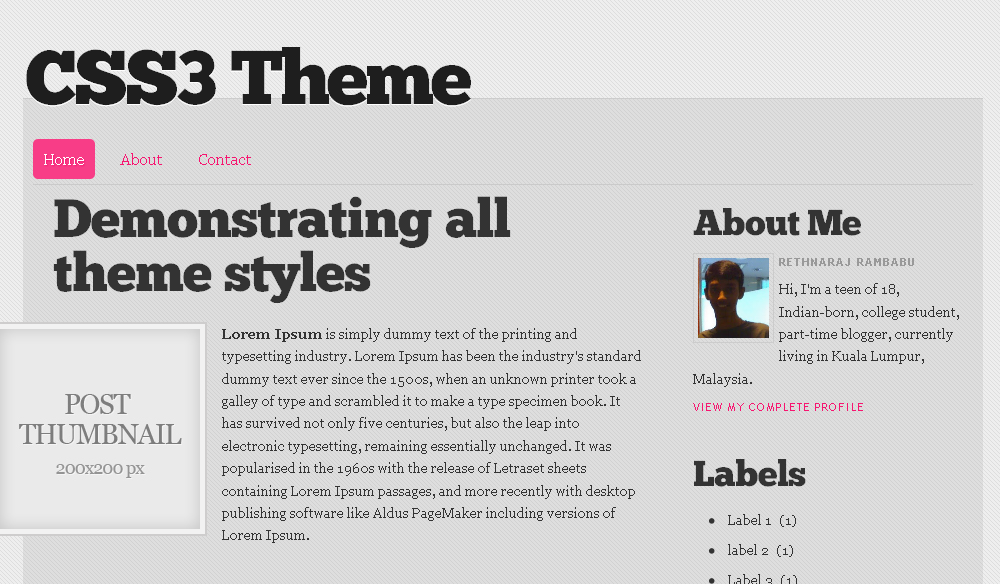 Although the original theme uses HTML5 fully, I’ve just used some of HTML5 features { eg: navigation menu[nav], sidebar[aside] } in this Blogger version of it. Here are some features of this theme:-
- Uses a lot of CSS3
- Uses the Chunk custom webfont to headings (thanks to Kernest.com)
- Drop-down navigation menu
- Free to use
- Cool design
The theme looks great in Safari, Chrome and Firefox except IE because of the CSS3 usage. Some of the CSS3 features like ‘transition’ property only can be viewed in Webkit browsers such as Google Chrome and Safari.


Editing Instructions
1. Navigation Menu
 <nav>
 <ul class='clearfix' id='menu'>
 <li class='current'><a href='#'>Home</a></li>
 <li>
 <a href='#'>About</a>

 <ul>
 <li><a href='#'>Subpage</a></li>
 <li><a href='#'>Subpage 2</a></li>
 </ul>
 </li>
 <li><a href='#'>Contact</a></li>
 </ul>

 <br class='clear'/>
 </nav>
2. Post Thumbnail- You have to add a class=”thumbnail alignleft” to the <img> tag in the post editor. The thumbnail image should have a width and height of 200px.
<img class="thumbnail alignleft" alt="" src="/images/thumbnail.jpg">
Great template bro..
DheTemplate recently posted..Screw Driver
Thank you, Dhe 🙂
Very lovely, elegant and simple. Another great one!
Earl recently posted..Sky- Sun- Leaves Lomo
Thank you, Earl. The credit goes to the original designer, Jesper. 😉
Nice Template…
BloggerTheme recently posted..Ancient Blog Blogger Template
Thank you, Krishna.
wow…. nice template.
Hi, I have this template on my blog, I love it. How do put the ability for people to comment on the homepage, so they don’t have to go in to individual posts to comment? I’d like it to sit next to the labels. I’d also like to add a time/date of posting here as well.
Kate, Blogger(TM) doesn’t have any option which allows us to comment in home page. We have to go to individual posts in order to comment. You may add a link to comments in the home page. To do that, find this code in ‘Edit HTML’ under ‘expand widget templates’ mode.
<div class=’postmeta’>
<span class=’btn alignleft’>
In <b:if cond=’data:post.labels’>
<data:postLabelsLabel/>
<b:loop values=’data:post.labels’ var=’label’>
<a expr:href=’data:label.url’ rel=’tag’ rel="nofollow"><data:label.name/></a><b:if cond=’data:label.isLast != "true"’>,</b:if>
</b:loop>
</b:if> by <b:if cond=’data:top.showAuthor’><span class=’fn’><data:post.author/></span></b:if>
</span>
</div> <!– end post meta –>
Add the following codes before the final <span> tag *{which is immediately above </div> <!– end post meta –> }* in the code above.
Comment link code
<b:if cond='data:post.allowComments'>
              <a class='comment-link' expr:href='data:post.addCommentUrl' expr:onclick='data:post.addCommentOnclick'><b:if cond='data:post.numComments == 1'>1 <data:top.commentLabel/><b:else/><data:post.numComments/> <data:top.commentLabelPlural/></b:if></a>
            </b:if>
Date code
Thanks…when i do that, I get this message: Your template could not be parsed as it is not well-formed. Please make sure all XML elements are closed properly.
XML error message: Open quote is expected for attribute “{1}” associated with an element type “cond”.
Hi Kate, I’ve updated my previous comment. Try again now. 🙂
Very nice template, thanks for your work…
Hi, this theme is so cool
but i have some problem to ask
How to use “read more” button in this theme
and setting max line will have “read more” button
Hi, thanks. You can only add the ‘read more’ manually by using jump-break feature in blogger post editor. You can break the post at anywhere you wish. Refer to the following link if you can’t find the jump-break button.
http://buzz.blogger.com/2009/09/you-might-as-well-jump.html
thank you very much!!!!!
i success it!!
but blogger can’t auto setup “read more” button it’s bad thing
I want this template fot wordpress normally.
Can you send me theme normally to my wordpress site?
I don’t think there is a WordPress version of this template. It was originally a HTML5 and CSS3 demo template.
i want a template to wordpress, i can pay to this.
Thanks
Enrique,
I’ve currently no plans on converting this into a WordPress theme, but you can check this comment if you want to try it yourself
http://jayj.dk/a-free-html5-and-css3-theme/#comment-1190
hi.
can we change comments into something else??
I’ve installed this, but I was wondering how do I edit the links under the about me?
Danielle, go to Design > Edit HTML > and look for the codes for the navigation menu which I’ve shown in ‘Editing Instructions’ above. Replace the # with the URL that you’ll point to. And change the default anchor text with your desired text.
Hey, i jut try to edit the menu, but i cant add links, i mean they dont redirect to the web, i dont know if i explain my self well, i dont speak too much english, but ive change “#” for the website that i want and nothing happen
Hiii! I would like to thank you for this wonderful layout!
But I was wondering… what if I’d like to show under my post the classic blogger things like “reactions”, “sharing buttons”, “quick edit”… I mean, the classic things at the end of a blogger post! I can’t find a way with this layout, I really would like to keep it but I need those sharing buttons and stuff!
Thank you so much!
Vivian
Vivian recently posted..5 Halloween costume tips- -8 days to Halloween!
aah ok ok I’m slowly re-adding all the stuff, I found the codes, don’t worry! thank you again for making this available for blogspot!
Vivian recently posted..5 Halloween costume tips- -8 days to Halloween!
Is there a way to change the sub-color from pink to something else, and how would I do that?
Tyler recently posted..Kanye West – A Beautiful Death Mixtape
I have one question
if I can see right…this template doesn’t display the date of the post…. is there a way to turn this on… in blogger settings somewhere ….or it’s just not part of this design?
thank you
ozren recently posted..Tetkine radosti vol 3
Hi Ozren, sorry for late reply. Actually, the date of the post is just not a part of this design.
http://jayj.dk/a-free-html5-and-css3-theme/
But, you can add date to your posts by following the steps below.
1. Go to Edit HTML > Check ‘Expand Widget Templates’ > search for
2. Paste the following code just after it.
<div class='postmeta' style='margin:20px 35px 0 0;'>
            <span class='btn alignleft'>
Posted on <data:post.dateHeader/>
                </span>
</div> <!-- end post meta -->
Good luck!
It is a part of the original template.
If you want to display the date you should use
There’s the datetime=”year-mm-dd” attitude to the time element, but I don’t know how to do what with Blogger.
Jesper recently posted..Skift logo på WordPress login side