 Today, I am releasing Revive, a free premium blogger template. The template is available in five different hot colours: pink, red, green, blue and orange. This is the first time I’m releasing multi-colour versions of the same template. I’ve managed to compress all five different colour versions into a RAR file. So that you don’t have to download them one-by-one which would really waste your time.
Revive Blogger Templates Demos
Here are the demo blogs of five versions of different colours of Revive Blogger Template.
Revive Orange Blogger Template
Download
Download Revive blogger template for your blog now.
Features of Revive blogger template
1. Featured contents slider
You can display your popular/featured posts here. The slider is only visible in home page of the blog and not in archive pages, post pages or static pages.

2. Multi-level drop down navigation menu
This CSS only multi-level dropdown menu works without any javascripts.
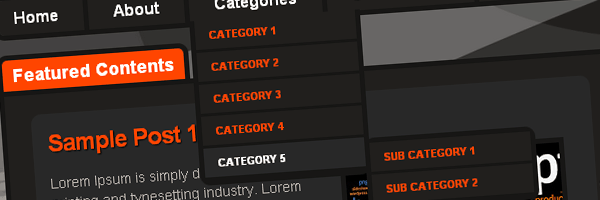
3. Tabbed sidebars
Only the first three widgets in the sidebar will be shown in tabbed sidebar. Thanks to Abu Farhan for this great feature.

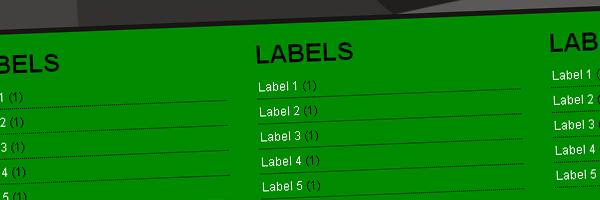
4. Three column footer
The template comes with a minimalistic three column footer.
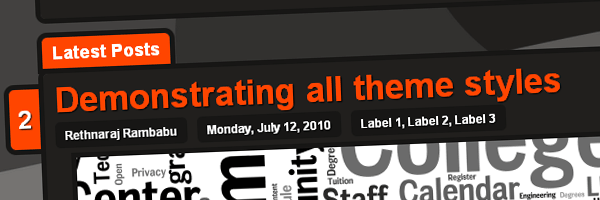
5. Post Title with comment bubble
Post comments number is shown in a small “tab” like feature beside every post title. The “tab” above the post wrapper shows “Latest Posts” in the home page and shows “You are reading” in post/static/archives pages.
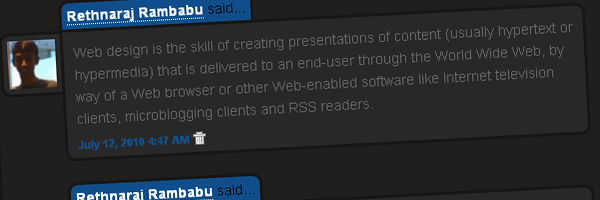
6. Unique Comments Display
Most of the blogger templates care less about the design of comments boxes. But, I’ve managed to design comment boxes with unique look. I’ve implemented the same technique used to display the comments in Intro Blogger blog in this template.
Editing instructions
1. Featured contents slider
- Replace the “Sample Post 1” between <h2>…</h2> tags in the code below with the post title of your featured posts.
- Replace href=’#’ with desired URL and src=’……’ with desired image source URL in <a href=’#’><img alt=” height=’145′ src=’http://3.bp.blogspot.com/_b8IA1ajBJG8/TDrdvgnIX1I/AAAAAAAABXs/mzdjCK7iZTg/slide_image.png’ width=’215’/> . The image height should be 145px and width is 215px. You can use slightly larger images if you want.
- And write a small summary about your featured post between <p>……</p> tags.
<div><div id='slideshow'> <div id='slidesContainer'> <div class='slide'> <h2>Sample Post 1</h2> <p><a href='#'><img alt='' height='145' src='http://3.bp.blogspot.com/_b8IA1ajBJG8/TDrdvgnIX1I/AAAAAAAABXs/mzdjCK7iZTg/slide_image.png' width='215'/></a>Lorem Ipsum is simply dummy text of the printing and typesetting industry. Lorem Ipsum has been the industry's standard dummy text ever since the 1500s, when an unknown printer took a galley of type and scrambled it to make a type specimen book. [...]</p> </div> <div class='slide'> <h2>Sample Post 2</h2> <p><a href='#'><img alt='' height='145' src='http://4.bp.blogspot.com/_b8IA1ajBJG8/TDredUF2mGI/AAAAAAAABX0/pnnpCRa-go8/slide_image2.png' width='215'/></a>Lorem Ipsum is simply dummy text of the printing and typesetting industry. Lorem Ipsum has been the industry's standard dummy text ever since the 1500s, when an unknown printer took a galley of type and scrambled it to make a type specimen book. [...]</p> </div> <div class='slide'> <h2>Sample Post 3</h2> <p><a href='#'><img alt='' height='145' src='http://3.bp.blogspot.com/_b8IA1ajBJG8/TDrdvgnIX1I/AAAAAAAABXs/mzdjCK7iZTg/slide_image.png' width='215'/></a>Lorem Ipsum is simply dummy text of the printing and typesetting industry. Lorem Ipsum has been the industry's standard dummy text ever since the 1500s, when an unknown printer took a galley of type and scrambled it to make a type specimen book. [...]</p> </div> <div class='slide'> <h2>Sample Post 4</h2> <p><a href='#'><img alt='' height='145' src='http://4.bp.blogspot.com/_b8IA1ajBJG8/TDredUF2mGI/AAAAAAAABX0/pnnpCRa-go8/slide_image2.png' width='215'/></a>Lorem Ipsum is simply dummy text of the printing and typesetting industry. Lorem Ipsum has been the industry's standard dummy text ever since the 1500s, when an unknown printer took a galley of type and scrambled it to make a type specimen book. [...]</p> </div> </div> </div>
2. Navigation menu
<div><div id='navigation'> <ul id='nav'> <li class='page_item'><a expr:href='data:blog.homepageUrl' title='Home'>Home</a></li> <li class='page_item page-item-51'><a href='#' title=''>About</a></li> <li class='page_item'><a href='#' title='Categories'>Categories</a> <ul> <li class='cat-item cat-item-3'><a href='#' title=''>Category 1</a></li> <li class='cat-item cat-item-4'><a href='#' title=''>Category 2</a> <ul class='children'> <li class='cat-item cat-item-8'><a href='#' title=''>Sub Category 1</a></li> <li class='cat-item cat-item-8'><a href='#' title=''>Sub Category 2</a></li> </ul> </li> <li class='cat-item cat-item-5'><a href='#' title=''>Category 3</a></li> <li class='cat-item cat-item-1'><a href='#' title=''>Category 4</a></li> <li class='cat-item cat-item-6'><a href='#' title=''>Category 5</a> <ul class='children'> <li class='cat-item cat-item-7'><a href='#' title=''>Sub Category 1</a></li> <li class='cat-item cat-item-9'><a href='#' title=''>Sub Category 2</a></li> </ul> </li> </ul> </li> <li class='page_item'><a expr:href='data:blog.homepageUrl + "feeds/posts/default"' title='Subscribe'><img class='headrss' src='http://2.bp.blogspot.com/_b8IA1ajBJG8/TBoCmcgoINI/AAAAAAAABHc/8zHrxkbrdXE/rss.png'/>Subscribe</a></li> <li class='page_item page-item-51'><a href='#' title=''>Contact</a></li> </ul> </div></div>
Leave your comments below or contact me if you need any further help on editing the template.
Hehehehehe… Very nice templates bro..
Dhetemplate, thank you..
great theme,is better if have light version.
PERFECT WEB 2.0 CONTACT CARD | DOOID
nice template 😉 great work 🙂
This is perfect, minimalist template. I get a perfect gentlemen.
Awesome designs… share your template to our blogger templates gallery. And I agree with aRkimz' it's better to create a light version.
Keep working..
@ColorizeTemplates,
Thank you for your encouragement… =)
I will try to create lighter version of it….
Congrats! That's a really nice template, it's good to see a new Blogger template a good as this one.
@Insight,
Thank you so much…I am totally crazed with your blog designs…And you're one of my role-models.
Thanks for dropping a comment… =)
Very very nice template!! But I have a problem. I try to insert the link of an image that I have in Picasa but it doesn't work. Do you have an idea?
My blog is: makeupsisters.blogspot.com
How to set the Read More button?
waaaww,niceeeeeee !!!
Hello i would like to delete the menu but how? i just wanna use the menu made by blogger , thanks
Maylmer, sorry. I didn't implements the pages menu widget in this template. You have to link to the pages manually by editing the code.
I wonder if you can turn the area into a link “latest posts” Take the example of my page. Excuse my English, it is not very good. I would appreciate answer to my mail, please!
Great templates… Thank you…
IT’S A BENVIE WORLD !! recently posted..Natural Alternatives To Relieve Sinus Infection Symptoms
Welcome… 🙂
One time I will definitely use it
thank’s bro
I loved the blue template… but if it was a grey or silver instead of black i would have downloaded and applied it immediately on my blog
Perhaps you will help me?
I realy love your template, but I dont need so much of it. Sorry, my english is bad. I hope you understand anyway. I dont need for example the Featured contents slider or Three column footer… Will you help me please!?
Hugs
From Sweden
Hi Sara,
I’ve visited your blog. Glad that you’ve removed the featured contents and footer by yourself. 🙂
is possivel to change the background color in theses templates? sorry, i don’t speak inglish well.
thanks
Hi Isaias Cardoso, you can change the background color in this template. Go to Edit HTML and search for
 body {
font-family:Arial, serif;
font-size:14px;
margin-top:-1px;
line-height: 20px;
background:url("http://2.bp.blogspot.com/_b8IA1ajBJG8/TDgEqZb-KzI/AAAAAAAABW4/Jdcqjf3BfYQ/headerbg.png") no-repeat fixed center top #211F1D;
}
You have to edit the “background: … ” to change the background color. Get hex code of a color and replace with #211F1D. That’s all. Good luck.